 Steady Thyme

Focus, one plant at a time.
Steady Thyme is a gentle focus timer for Windows. Pick one thing to work on, start a session, and a tiny pixel-art plant grows on your island while you do.
Free for Windows 10 and 11, Mac, and Chrome. No account. No ads. No guilt.

A calm way to start
Three small steps. Nothing to set up, nothing to learn first.
Name what you're doing
Add a task or two, like "write the report" or "tidy the kitchen". The timer suggests a plant that grows for about as long as your work will take.
Start a session
Choose a plant, from a quick 5-minute sprout up to a 4-hour epic, and press start. A small floating widget keeps the timer in a corner while you work.
Watch your island grow
When the time is up, your plant is fully grown and joins the island. Every finished session adds something new to look at.
A garden that's yours
Six hundred hand-made pixel plants, three little biomes, and an island that fills up at your own pace.
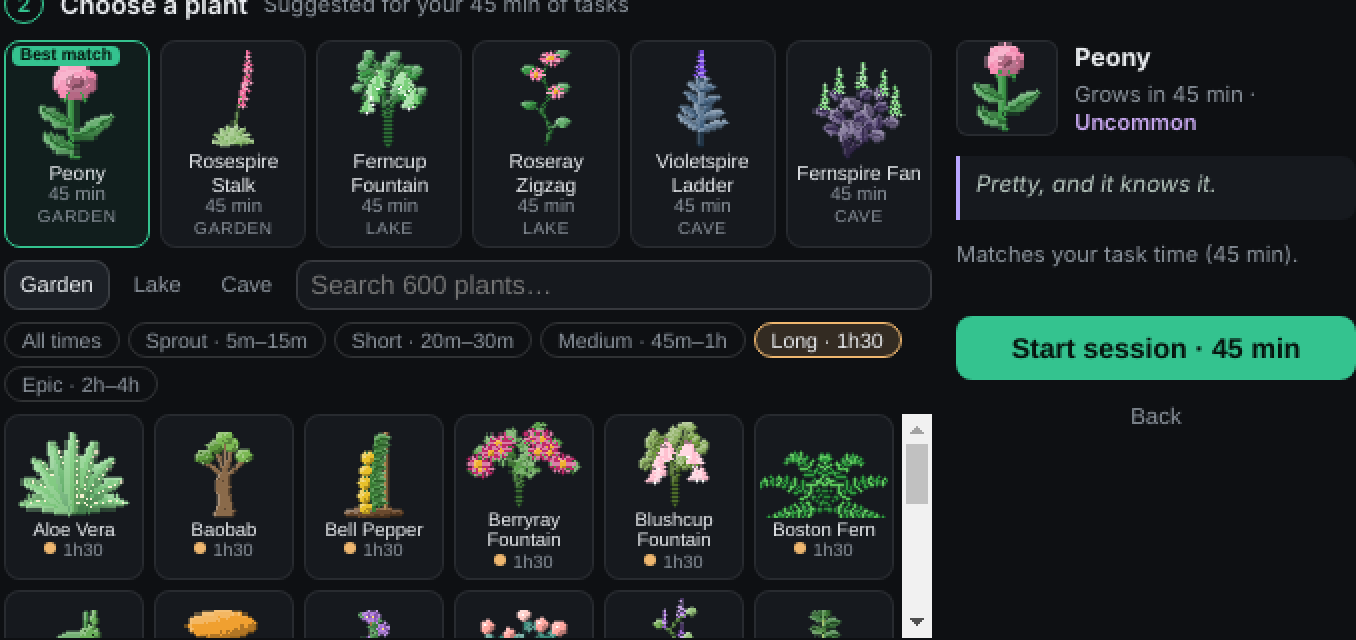
Pick a plant that matches the time you have.
- 600 plants to grow across garden, lake and cave biomes, each one with its own little line of personality.
- Sessions from 5 minutes to 4 hours. Short sprouts for small jobs, big slow growers for deep work.
- Golden plants appear now and then, about 1 in 200, with a soft glow. The odds are shown in the app.
- Mystery plant. Start a free timer and a dark silhouette grows. You find out what it was when you finish.
- Islands to keep. When an island reaches 500 plants it's saved to your collection and a fresh one begins.






Day and night change smoothly, and the seasons follow along, on your island and in the corner widget.
"Gentle by design. If you stop early, your plant stays as a baby plant. Pause whenever life happens. Nothing wilts, and nothing is ever taken away."
Built to be kind to your brain
Made for people who find focus tools stressful. No streak pressure, no punishment, no noise.
No punishment
Plants never die. Stop early and you keep a baby plant. Pause with no penalty. Sleep time isn't counted against you.
A soft nudge, not a nag
When you open your computer, an optional quiet notification says hello and invites you to start. Never more than once in a while, and never at night.
A small floating widget
Keep a tiny growing scene in the corner of your screen. Resize it, drag it anywhere, or make it click-through so it never gets in the way.
Keyboard shortcuts
Open Steady Thyme, start and stop, or toggle click-through from any app, with shortcuts you can change.
Private and offline
Your garden lives on your own computer. No account, no sign-in, no tracking. Daily backups are kept for you automatically.
Quiet stats
See your focused time and finished plants whenever you like, and export a backup or a spreadsheet of your sessions.
Get Steady Thyme
Free to start. Pick your device below: Windows 10 and 11, Mac, or the Chrome extension.
Want to hear about updates? Send a note and I'll let you know, once, with no spam.
Email me about updatesQuestions
The short, honest answers.
Is it really free?
Yes. The core app is free. Later there may be optional extras, like extra plant packs, but the everyday garden and timer stay free.
Does it show ads or need an account?
No ads and no account. You open it and start.
Where is my garden stored?
On your own computer, in a small file. The app keeps daily backups and lets you export your data. Nothing is sent anywhere.
Does it work offline?
Yes, completely. It never needs the internet to run.
Which computers does it run on?
Windows 10 and 11, Mac, and Chrome (as an extension). The garden, plants and timer are the same everywhere.
How do I install it on Mac or Chrome?
On Mac, download the app, then right-click it and choose Open the first time, because the Mac version is not yet signed by Apple. In Chrome, use the Add to Chrome button. Email hello@steadythyme.com if you get stuck.
What happens if I stop a session early?
You keep a baby plant for the time you did focus. You can also pause without any penalty. Nothing is lost.
I found a bug or have an idea.
Please email hello@steadythyme.com. Every message is read.